
Digital Literacy with Minecraft (EveryDay Heroes)
A story-based introduction to coding in Minecraft Education
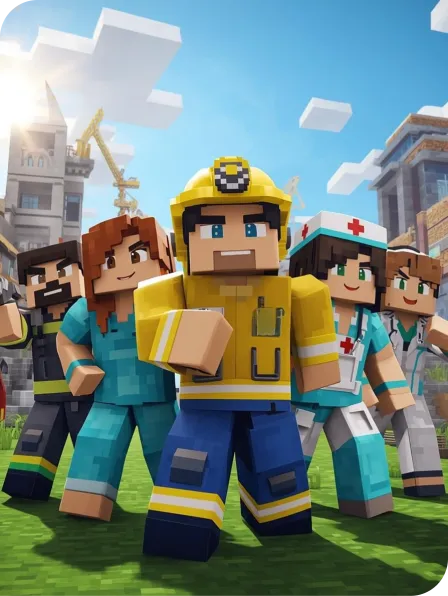
Everyday Heroes is a beginner-friendly coding program designed for young learners in Prep to Year 2, introducing coding through storytelling and the world of community helpers.
In this program, children use simple commands and sequences inside Minecraft Education to bring firefighters, nurses, builders, and other everyday heroes to life. Through playful digital scenes and interactive stories, students explore early coding ideas such as sequencing, cause-and-effect, and basic logic while learning how helpers support and strengthen their communities.
What Kids Will Learn (Beginner Level)
Your child will:
Build foundational coding skills using simple commands and sequences
Learn early coding concepts like sequencing and cause-and-effect
Strengthen creativity and storytelling through community-themed builds
Design environments and animate characters in simple interactive scenes
Develop early problem-solving and digital confidence
Explore ideas of empathy, teamwork, and helping others
Why Parents Love It
Everyday Heroes offers a gentle and meaningful introduction to coding through familiar, real-world themes.
The focus on community helpers keeps young learners engaged, while Minecraft Education provides a safe and creative space to experiment, build confidence, and develop early STEM skills.
It also supports social understanding and prepares students for more advanced Minecraft Education programs as they grow.
Digital Literacy with Minecraft (EveryDay Heroes) is available at

Please note
In order to enrol in a School Term Program, you must be a student of that school
Computer Requirements
Students are required to bring their own device and power cord. Accepted devices include laptops (Windows, Mac) and iPads/Tablets. If students are using an iPad, we highly recommend you also bring a detachable keyboard (Bluetooth tethered).
If your child is not proficient with using a laptop trackpad, please bring your own MOUSE. If you would like to save work to take home, please also bring along a USB.
Minecraft Education provides minimum recommended system requirements for Windows, Mac, iPad and Android devices. It is highly recommended that students’ device specifications are well above these requirements, as older slower devices can struggle with processing speed.
For current requirements: https://educommunity.minecraft.net/hc/en-us/articles/360047556591
Installation Details
Minecraft Education user logins are included with the cost of this course. Please download and install Minecraft Education to your child’s device before attending the class.
Please download Minecraft Education here: https://education.minecraft.net/get-started/download
You might also like
Lego Mindstorms
Code, build and program a robot using Lego Mindstorms technology!
Minecraft Education Aqua Mode
Kids learn the fundamentals of drag and drop coding in our Minecraft Education course, jam packed with underwater adventures, they'll build spatial awareness, problem-solving skills, and creativity!
Minecraft Education Space Mode
Learn coding in our Minecraft Space Mode classes: jam packed with fun coding activities and all the tools your kids need to become a true digital space cadet.